Read Vendor Invoice (A.I.)
Jewelry store program
Attach the vendor’s PDF, a scan or a phone photo to a bill. A.I. reads it, WJewel checks that it adds up, and the lines are typed in for you to review and save.
See how it works →Point of sale, inventory, repairs, custom orders, customers, accounting and built-in A.I., built specifically for jewelry stores and for wholesalers and manufacturers.
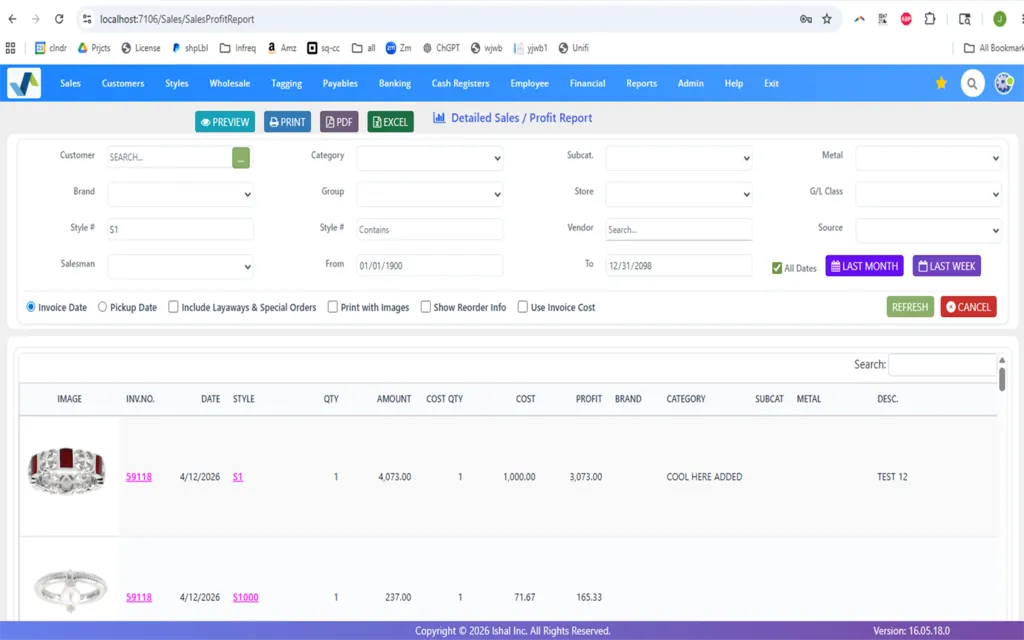


The counter, the back office, the shop and the customer, in one program. These are real WJewel screens.
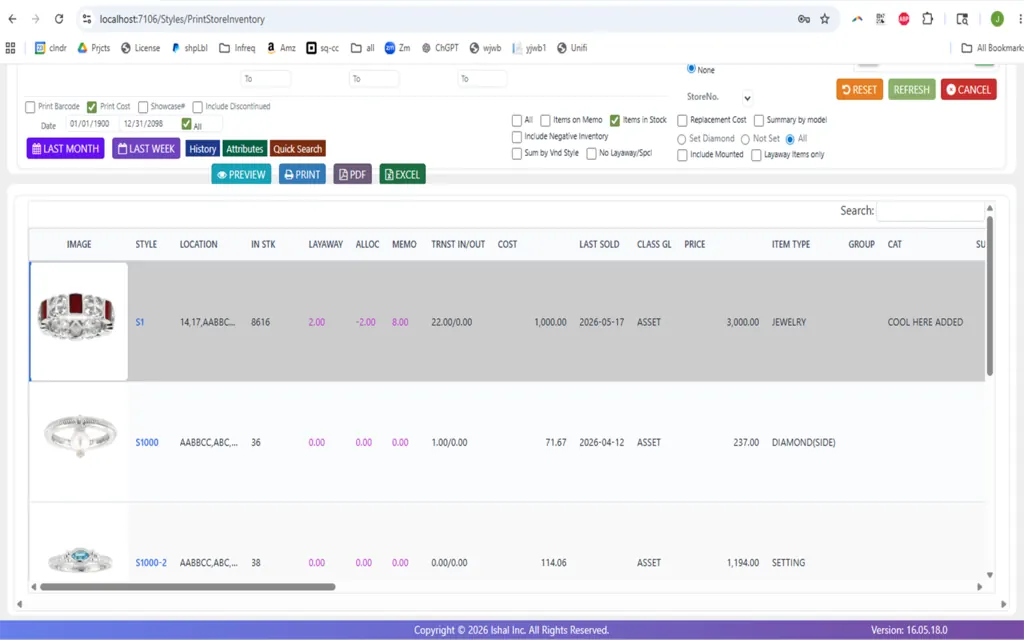
Know your stock
Every style with its picture, where it is, what is in stock, on layaway or out on memo, its cost, when it last sold and its price. Print it, or send it to PDF or Excel.
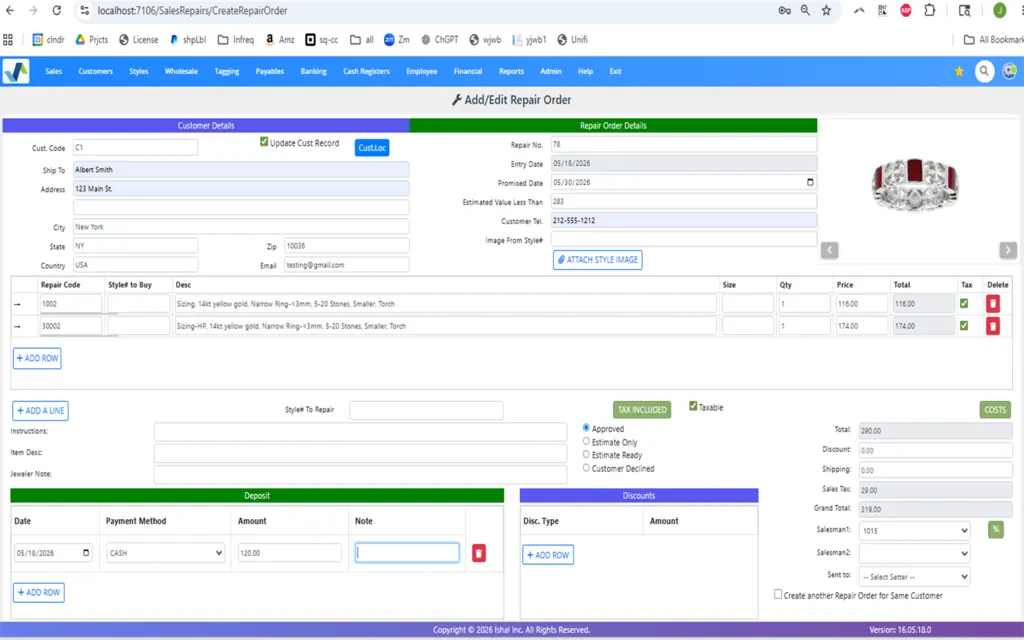
Keep work moving
Take in a repair with the customer’s details, a photo of the item, the work, the promised date and a deposit. Then track the job bag from the store to the shop and back to pickup.
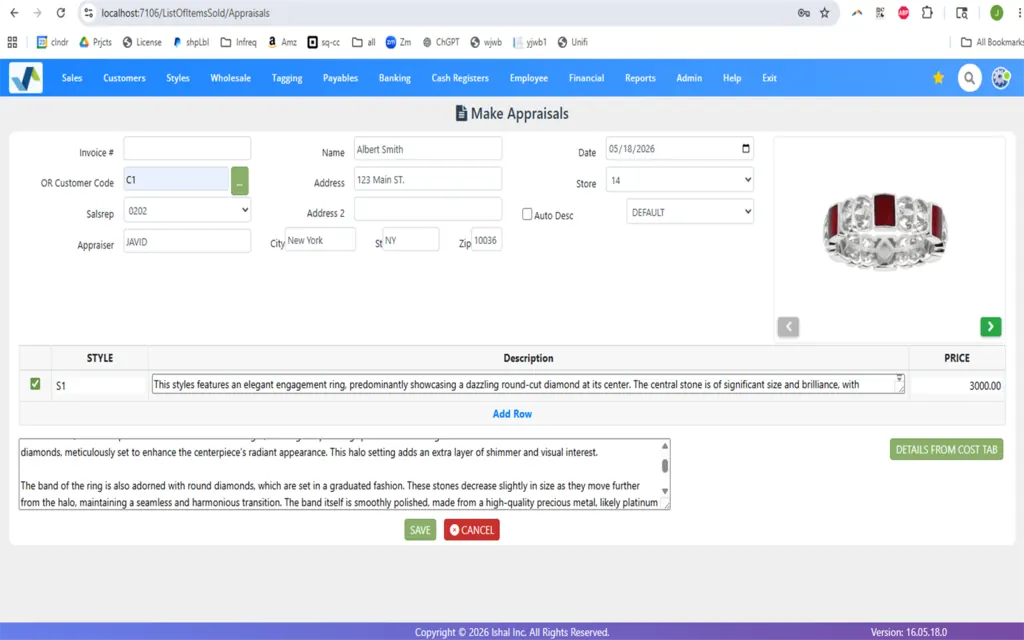
At the counter
Sales, returns, exchanges, gift cards, layaways, store credit and customer accounts. Appraisals start from the style, with an A.I.-written description of the piece that you read and edit before you save.

Know your customers
Customer history and linked family accounts. Your customers sign in to see their balance, layaways, special orders, repairs and appraisals, and pay online, without calling the store.

For manufacturers
Give job bags out to casting, setting and polishing and take them back in, with the quantity and weight each way and the loss on every job. Casting is priced by weight from the day’s metal price.
Type it the way you would say it out loud. Ask AI answers from your live sales, inventory, customer and vendor data, and shows the rows behind the answer.

What happened on this screen
break it down by the year and show me $ amount of sales and profit.
Questions jewelers ask it
Ask AI only reads. It never changes your books, sees only your own records and follows the user permissions you have already set.
Jewelry store program
Attach the vendor’s PDF, a scan or a phone photo to a bill. A.I. reads it, WJewel checks that it adds up, and the lines are typed in for you to review and save.
See how it works →Jewelry store program
Turn a style’s product picture into a realistic photo of the piece being worn, for your website and social media, without a photo shoot.
Watch the 1-minute video →Retail and wholesale
See what is likely to sell, by style, category or vendor, from your own sales history, and how many of each style to order.
Explore forecasting →A jewelry store and a jewelry manufacturer do different work. WJewel has a program for each.
For jewelry stores
For wholesalers & manufacturers
The worry is rarely the new software. It is years of inventory, customer history and open layaways in the old one. Our team does the move for you.
A live demo with your own questions, and a review of your current data together: what carries over, what needs cleaning and what is better left behind.
Inventory, customers, vendors, open layaways and repair history, from The Edge, Jewelry Shopkeeper, JewelMate, Lightspeed, Business Mind, QuickBooks and others. We take CSV, Excel, VFP and SQL backups and QuickBooks exports, and our team handles the mapping, so nothing is re-entered by hand.
Your account, tag and receipt layouts and hardware, set up for the way your store or office works.
Up and running in 1 business day with no data to import, or up to 7 business days when we import it. Training is unlimited, and support is there 365 days a year.
Setting up, in their words
“We have been in the jewelry industry for over 25 years, and tried 2 other software packages before switching to this software. Ease of use and customer support are amazing, Software was designed by people who know the jewelry industry inside out, we did not have to adapt to the software, the software adapted to our needs.”
“Professional and quick. Explained the process and I had to do nothing. They took over the system and did all the work.”
How to switch jewelry POS systems · Coming from The Edge · Coming from Jewel360
WJewel has been built around the jewelry trade for nearly four decades. The team knows the real work behind inventory, memos, repairs, metals, stones and accounting, and can customize the software to the way you work.
The full WJewel program, not a cut-down companion app, on every device you own.
What WJewel customers say.
“WJewel covers everything we need to run our jewelry store in one system — invoicing, repair orders, inventory, scrap gold buying, and full accounting (AP/GL) without needing separate software. … It’s clearly built by people who understand the jewelry trade — things like karat/metal tracking, style-level costing, and repair workflows work the way a real store operates, not like a generic retail POS with jewelry features bolted on.”
“The software has some really nice features to manage memo and consignment in Retail Jewelry. Also, it has nice office automation tools to record recurring APs. Gold purchases are a breeze. … If we have a problem, the developer fixes it. They are happy to make the software do what we need it to do.”
“The Software performs excellent in managing our inventory, customer data base. … They are very quick to respond to any requests to software modifications and hardware conflict resolutions.”
“It is cost-effective, easy to implement and the training of employees was also a smooth process. Customer support is always available and a quick response time. … We can keep track of items down to a very detailed level and track and manage inventory effectively.”

4.8 out of 5 from 73 verified reviews on Capterra
Ease of use 4.8 · Customer service 4.9 · Read the reviews



The latest additions to WJewel, for retail jewelers and wholesalers alike.
For jewelry stores: stock counts sent to Shopify every hour, loyalty points and gift cards that work online and in the store, and “in stock at your store” on Google.
For jewelry stores: scan two or three pieces, or set them on the RFID tray, and a tablet shows the customer their pictures and specs side by side. Watch the 1-minute video
Download Stuller’s products, diamonds, lab-grown diamonds and gemstones into WJewel, and fill in a style’s description, cost, retail price, metal weight and pictures straight from its Stuller SKU.
Send customer statements, email inventory reports and run other routine jobs automatically, on the schedule you set.
Download your transactions directly from your bank and reconcile them in WJewel — no retyping statements.
Let your website, CRM or other software work with WJewel directly — add new customers, look up inventory, and more.








Plus Geller Blue Book repair pricing, UPS, and MalcaAmit. See all integrations →
Both. WJewel is used by single-location independent jewelers, regional chains, and multi-location wholesalers and manufacturers. A single store can run WJewel on one register; a chain can run real-time inventory sync across locations, cross-store transfers, store-level pricing and permissions, and consolidated reporting. Scale up modules and locations whenever your business grows.
Most sales associates are confident at the register within a couple of days: checkout, lookup, repair intake and basic customer management. Deeper features such as custom reporting, accounting, memo in/out, RFID audits and multi-store transfers typically take 2–4 weeks of regular use. Training is unlimited, and new hires are trained whenever you bring them on.
Yes. We recommend and quote the exact hardware for your store: POS terminals, receipt printers, jewelry tag printers (barcode or RFID), cash drawers, barcode scanners, RFID readers and card processing. You can buy hardware directly from us or source it yourself, whichever you prefer.
Yes. Watch the demo video, request a live demo to see WJewel with your own questions, or start the 30-day free trial, for retail or wholesale. A card is required to start the trial, but it is not charged for the first 30 days as long as you cancel before then.
Leave your name and number. We’ll show you the features that matter to your business, using your own questions and the way you work today.
Prefer to talk? Call (646) 578-8300 · Make an appointment · 30-day free trialPublished: · Last updated: